Showing posts with label obi trouble shoot. Show all posts

Thursday, 28 July 2016

OBIEE 11g BI Publisher error: unauthorized Access: Either you do not have the privilege, or you have not signed in


OBIEE 11g BI Publisher error: unauthorized Access: Either you do not have the privilege, or you have not signed in:

From log file:
access denied for user  to path /users/weblogic.; nested exception is: [[

Solution:
  1. Delete the corresponding user folder and .atr from catalog->root->users folder
  2.  Restart opmnctl.


Sunday, 17 July 2016

Weblogic Admin Server for oam_domain failed during startup due to invalid boot.properties files- Server state changed to FORCE_SHUTTING_DOWN

When I try to start BI server, found below error from weblogic server.
Weblogic Admin Server for oam_domain failed during startup due to invalid boot.properties files.
Error:
<Notice> <Security> <BEA-090082> <Security initializing using security realm myrealm.>
<Critical> <Security> <BEA-090402> <Authentication denied for weblogic: Boot identity not valid; The user name and/or password from the boot identity file (boot.properties) is not valid. The boot identity may have been changed since the boot identity file was created. Please edit and update the boot identity file with the proper values of username and password. The first time the updated boot identity file is used to start the server, these new values are encrypted.>
weblogic.security.SecurityInitializationException: Authentication denied for weblogic: Boot identity not valid; The user name and/or password from the boot identity file (boot.properties) is not valid. The boot identity may have been changed since the boot identity file was created. Please edit and update the boot identity file with the proper values of username and password. The first time the updated boot identity file is used to start the server, these new values are encrypted.
at weblogic.security.service.CommonSecurityServiceManagerDelegateImpl.doBootAuthorization(Unknown Source)
at weblogic.security.service.CommonSecurityServiceManagerDelegateImpl.initialize(Unknown Source)
at weblogic.security.service.SecurityServiceManager.initialize(Unknown Source)
at weblogic.security.SecurityService.start(SecurityService.java:141)
at weblogic.t3.srvr.SubsystemRequest.run(SubsystemRequest.java:64)
at weblogic.work.ExecuteThread.execute(ExecuteThread.java:201)
at weblogic.work.ExecuteThread.run(ExecuteThread.java:173)
>
<Notice> <WebLogicServer> <BEA-000365> <Server state changed to FAILED>
<Error> <WebLogicServer> <BEA-000383> <A critical service failed. The server will shut itself down>
<Notice> <WebLogicServer> <BEA-000365> <Server state changed to FORCE_SHUTTING_DOWN>
<Info> <WebLogicServer> <BEA-000236> <Stopping execute threads.>
Sol:

  1. Delete boot.properties (location: DOMAIN_HOME/servers/AdminServer/security)
  2. Delete ldap directory (location: DOMAIN_HOME/servers/AdminServer/data)
  3. Restart the weblogic server

Error [Security:090302]Authentication Failed: User BISystemUser denied

While Starting the weblogic server I am getting below error:
Caused by: oracle.security.jps.internal.jaas.module.AuthenticationException: [Security:090304]Authentication Failed: User BISystemUser javax.security.auth.login.FailedLoginException: [Security:090302]Authentication Failed: User BISystemUser denied at oracle.security.jps.wls.jaas.module.authentication.WlsUserAuthenticator.authenticate(WlsUserAuthenticator.java:61) Caused by: javax.security.auth.login.FailedLoginException: [Security:090304]Authentication Failed: User BISystemUser javax.security.auth.login.FailedLoginException: [Security:090302]Authentication Failed: User BISystemUser denied
Sol:
  1. Create BISystemUser in weblogic console->Security Realms->myrealm and assign Administrator and Oracle System Groups.
  1. Update  the password of BISystemUser in EM Console, BIFoundationDomain, Security, Credentials

  1. Restart the BI Services

Friday, 15 July 2016

How to start, stop and status of obiee 12c services

Go to below path:
ORACLE_HOME\user_projects\domains\bi\bitools\bin
Start.cmd command for starting the bi Services
Stop.cmd command for stopping the bi services.
Status.cmd command for Status of the Server


obiee 12c rpd onling opening issue (nQSError: 37001, nQSError: 12001, nQSError: 12010, nQSError: 12008)

While opening the rpd online mode experienced below error(nQSError: 12001, nQSError: 12010, nQSError: 12008)
Solution: verify the odbc connection port with the bi server port in enterprise manager.(note: make sure that both odbc port and biserver port needs to be same if not change the odbc connection port)

So Change the odbc dsn port to bi server port. It will work

Wednesday, 13 July 2016

Trouble shoot: while starting bi server- error ORA-28001:The password has expired

While starting OBIEE Server getting below error because of schema password expiry.
C:\Users\vinodp\Desktop\Capture.JPG
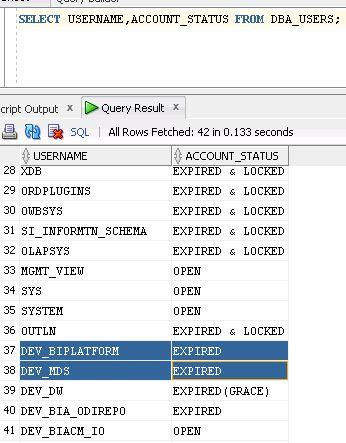
Trouble Shoot: check the schema status
C:\Users\vinodp\Desktop\Capture1.JPG
Solution:
1. Connect as sysdba to the database.
C:\Users\Siry>sqlplus / as sysdba
2. Set the password’s life time to unlimited.
SQL> ALTER PROFILE DEFAULT LIMIT PASSWORD_LIFE_TIME UNLIMITED;
4. Set the password for user.
SQL> ALTER USER user_name IDENTIFIED BY password;
6. Unlock the user account.
SQL> ALTER USER user_name ACCOUNT UNLOCK;
8. Make sure your user is not locked by executing below query.
SQL> SELECT USERNAME, ACCOUNT_STATUS FROM DBA_USERS;