
Agents automates the process of delivering reports and dashboards
Configure Email settings:
- Login to Fusion Middleware Control Enterprise manager (http://yourservername:7001:/em) using Admin user credentials
- Navigate to Mail tab (Business Intelligence > coreapplication > Deployment>Mail
- Click Lock and Edit Configuration to enable changes to be made.
- Complete the elements with the following information.
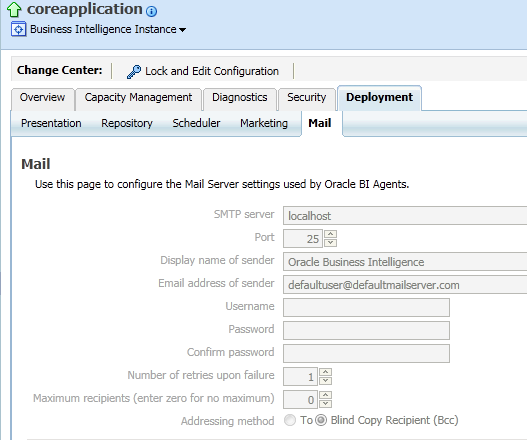

• SMTP Server – SMTP server of your email
• Port – Port of the SMTP server (e.g. 25)
• Display name of sender – Any name(e.g.Oracle Business Intelligence)
• Email address of sender – Sender’s email address
• Username – Same as the sender’s email
• Password – password of your email
• Confirm password – confirm the same password as above
• Number of retries upon failure – any number
• Maximum recipients
• Addressing method To, Blind Copy Recipient (Bcc) – if you want to receive a BCC, select it.
- ctivate Changes.
- Return to the Business Intelligence Overview page and click Restart.
